Building a great Roblox game is only half the challenge. Getting players to discover it is where most developers struggle.
Roblox reported an average of 127 million daily active users in 2025, with players spending 123.9 billion hours across experiences annually. Yet thousands of games compete for attention every day.
This means quality alone rarely drives growth. Without a promotion strategy, even well-designed experiences can remain invisible to potential players.
Fortunately, Roblox now offers multiple advertising tools, including Ads Manager, Sponsored Experiences, Search Ads, and Immersive Ads designed specifically for game discovery.
Developers can also combine Roblox advertising with influencer campaigns, TikTok videos, YouTube content, and community-driven promotion to accelerate player acquisition.
In this guide, you’ll learn exactly how to advertise a game on Roblox, choose the right ad formats, and build a marketing strategy that promotes your Roblox game effectively in 2026.
Can You Advertise a Game on Roblox?
Yes, you can advertise a game on Roblox using official ad systems designed for developers and creators today.
Roblox provides a self-serve advertising ecosystem where developers can run campaigns through Ads Manager and sponsored placements easily.
Advertising options include Ads Manager campaigns, Sponsored Experiences, Search Ads, and immersive formats available within Roblox ecosystem today.
While Roblox ads are accessible performance depends on targeting, creative quality, and continuous campaign optimization strategies you apply.
Key Roblox advertising methods include:
- Ads Manager campaign setup for targeted reach.
- Sponsored Experiences for in-game visibility boosts.
- Search Ads for intent-based discovery.
- Immersive Ads for interactive engagement formats.
These options allow developers to control budget, audience targeting, and placement across Roblox’s growing gaming ecosystem.
How to Advertise a Game on Roblox Using Ads Manager
Roblox Ads Manager allows developers to promote their games using structured advertising tools designed for targeted reach and better visibility. It provides control over budget, audience targeting, and ad placement across different discovery formats.
Below are the step-by-step actions you need to follow to set up and run a successful Roblox ad campaign inside Ads Manager.
Step 1: Create a Roblox Ad Account
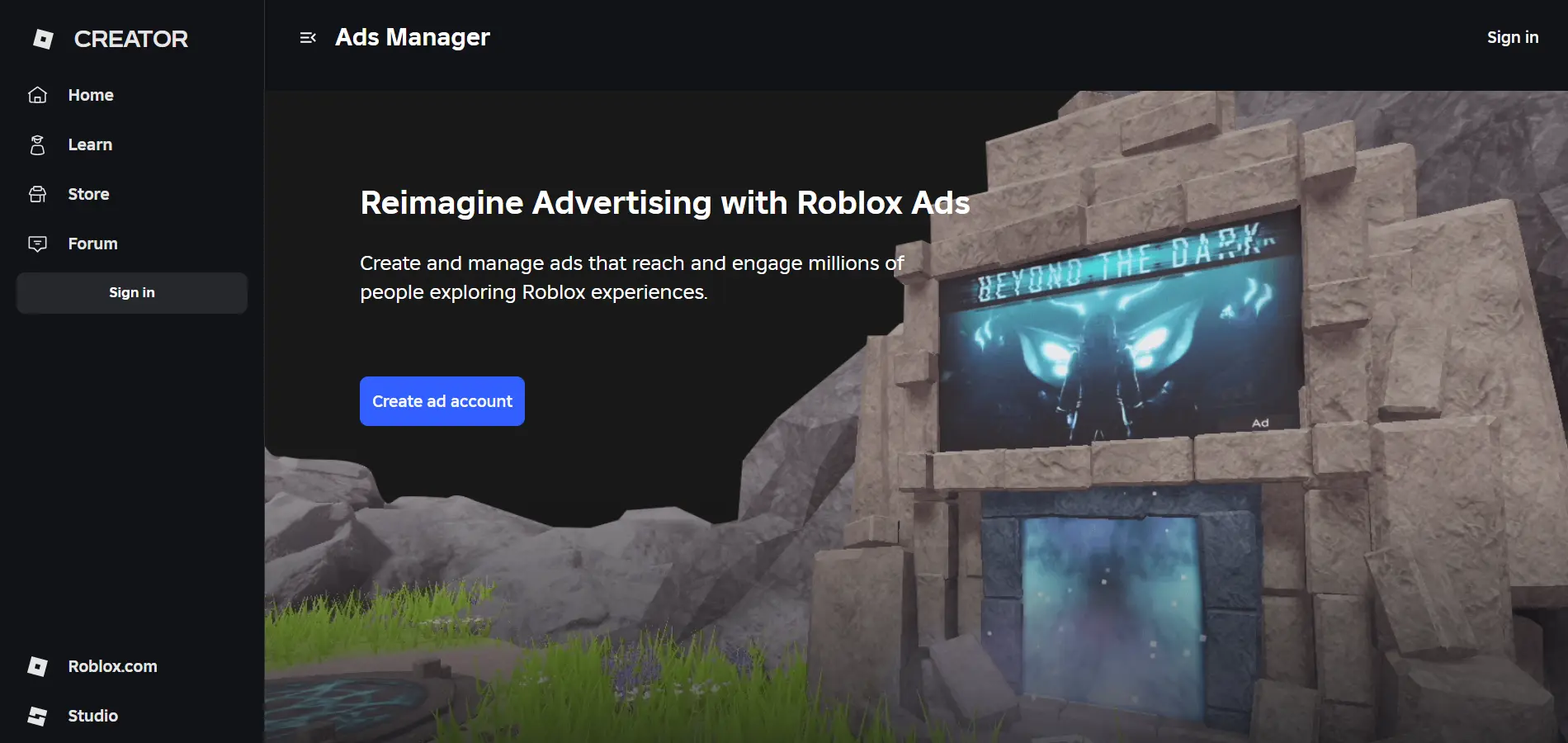
To run ads on Roblox, you first need to create and activate an official ad account inside the Roblox Ads Manager system.
Start by signing into your Roblox account and opening the Creator Hub dashboard from the official Roblox website.
Inside the Ads Manager section, click on “Create Ad Account” to begin the setup process. You will be asked to choose between a personal ad account or a business ad account depending on your use case.
After selecting the account type, confirm your details and complete the account creation step to activate Ads Manager access.
Next, you must set up billing under “Bills & Payments” and add a valid payment method or ad credits. Roblox requires a verified payment method or a Robux-to-credit conversion before any campaign can be launched.
Once this setup is complete, your ad account becomes active and ready for campaign creation inside Ads Manager.
Step 2: Choose Your Campaign Objective
After creating your ad account, the next step is selecting your campaign objective inside Roblox Ads Manager. This decides how Roblox will optimize your ad delivery and who will see your game.
Start by clicking “Create Campaign” inside Ads Manager and selecting the experience you want to promote.
Next, you will see the “Goal” or “Objective” section, where you must choose what you want to achieve. Roblox currently focuses on objectives like Plays, which targets users most likely to join and actively play your game.
If your goal is early-stage growth, selecting Plays helps you get initial traffic and test your game performance.
For already popular games, this objective helps improve engagement quality and brings returning or high-intent players.
Once selected, Roblox automatically adjusts targeting, bidding, and delivery to match that objective and maximize results.
Step 3: Select Your Ad Format
Begin by entering the “Ad Format” section while setting up your campaign.
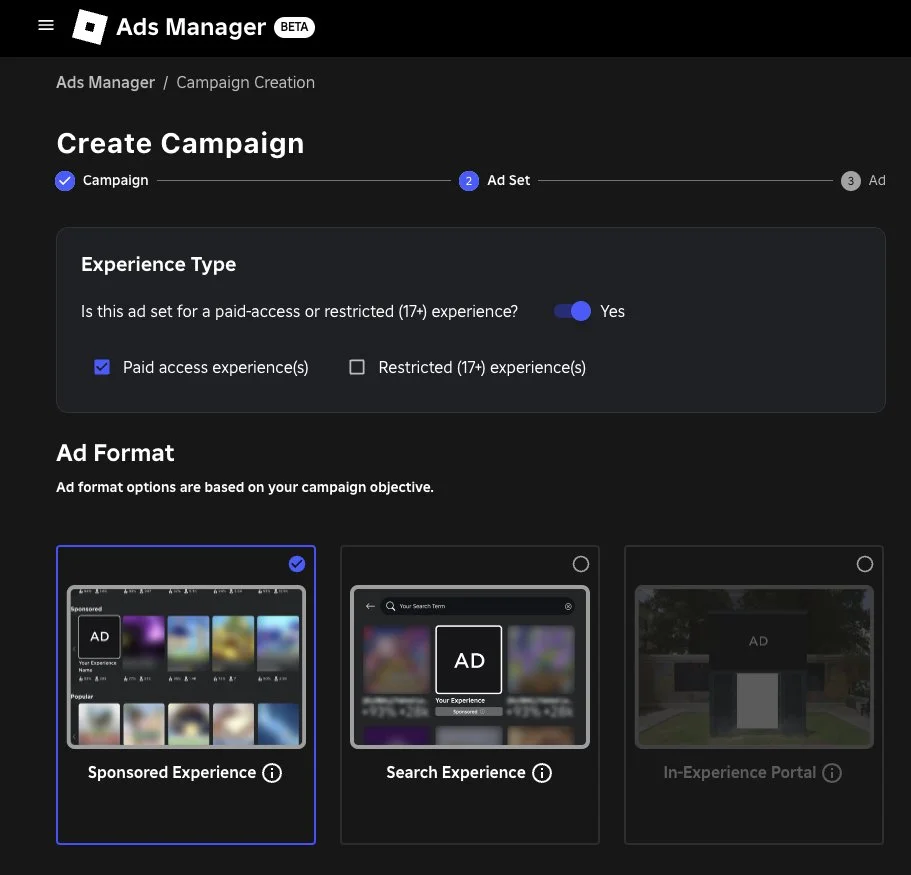
Roblox mainly offers formats like Sponsored Experiences, Search Ads, and Immersive Ads, each designed for different discovery paths.
- Sponsored Experiences place your game directly in discovery feeds where users explore new games, helping increase visibility quickly.
- Search Ads show your game when users search for specific keywords or similar experiences, making them highly intent-driven.
- Immersive Ads display interactive or visual ad units inside Roblox environments, increasing engagement through richer experiences.
Choose one format based on your goal, or test multiple formats separately to compare performance before scaling.
Step 4: Set Your Budget and Schedule
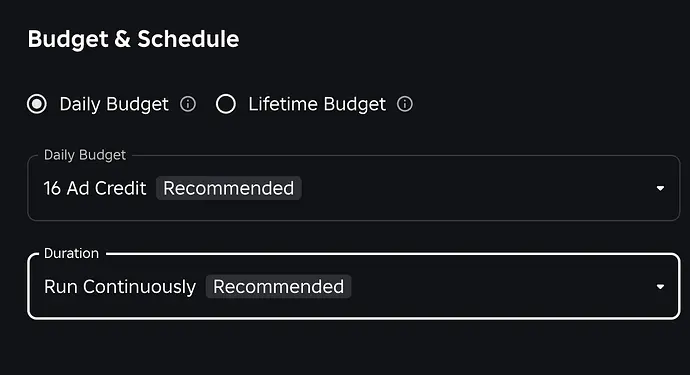
After selecting your ad format, the next step is defining your budget and campaign schedule inside Roblox Ads Manager. This controls how much you spend and how long your ads will run.
Start by entering the “Budget” section during campaign setup.
You can choose a daily budget, which limits how much Roblox spends each day, or a total campaign budget for the full duration.
A higher budget generally increases your ad visibility, especially in competitive game categories where bidding is active.
Next, set your bidding amount, which tells Roblox how much you are willing to pay per result, such as a game visit or engagement.
After that, move to the scheduling section and select your campaign start and end dates.
For new games, shorter test campaigns help you understand performance before scaling budgets.
For established games, longer campaigns ensure consistent visibility and stable player acquisition over time.
Step 5: Launch and Monitor Your Campaign
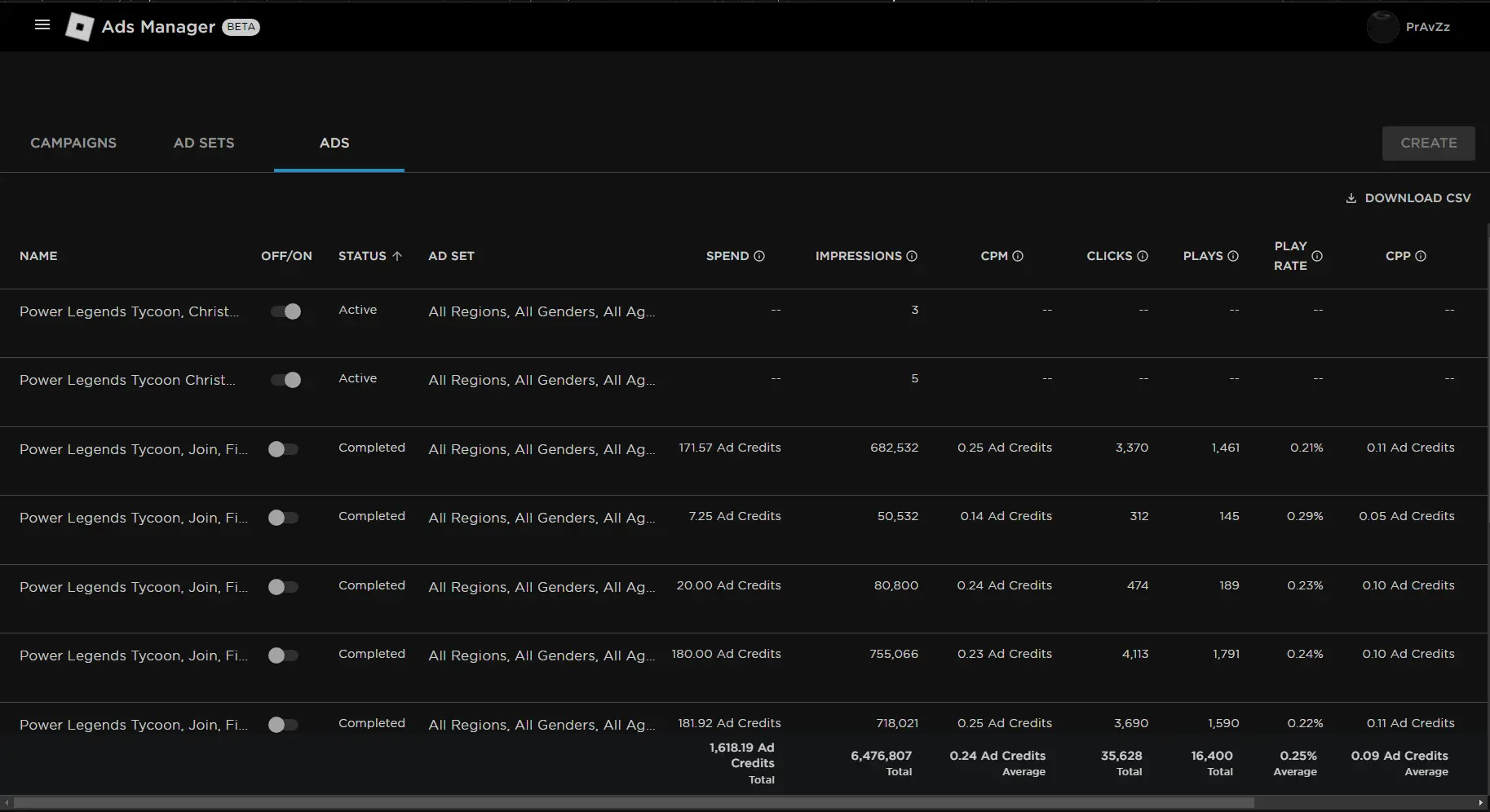
Click “Launch Campaign” after confirming your objective, ad format, budget, and schedule inside Ads Manager.
Once live, track performance using Roblox Ads Manager analytics dashboard. Monitor key metrics such as impressions, play rate, clicks, and cost per result.
Identify which ads bring high engagement and which fail to attract players. Pause low-performing ads and shift budget toward better-performing creatives or placements.
Test new creatives regularly to avoid performance drop over time.
Use real data from campaign results to refine targeting and improve future ad performance.
By following these steps, developers can successfully launch Roblox ad campaigns that improve visibility, attract targeted players, and support consistent game growth over time.
Roblox Ad Formats You Need to Know
Understanding Roblox ad formats is important because each format changes how players discover and interact with your game.
1. Sponsored Experiences
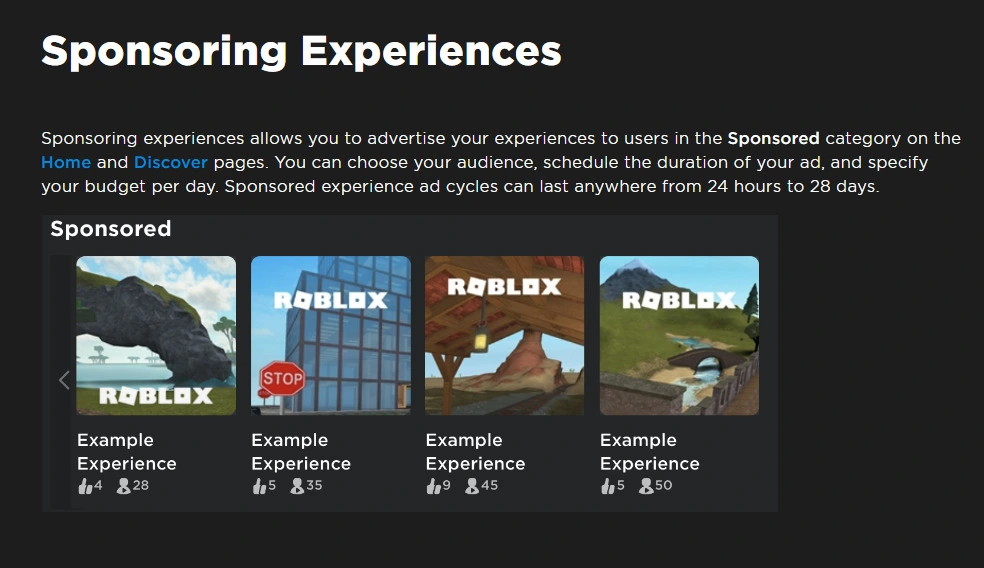
Sponsored Experiences place your game directly inside Roblox discovery surfaces, where players actively browse and explore new games.
This format is ideal for quickly increasing visibility, especially for new or low-traffic experiences that need initial exposure.
It increases chances of first-time visits by positioning your game in high-traffic recommendation slots.
2. Search Ads
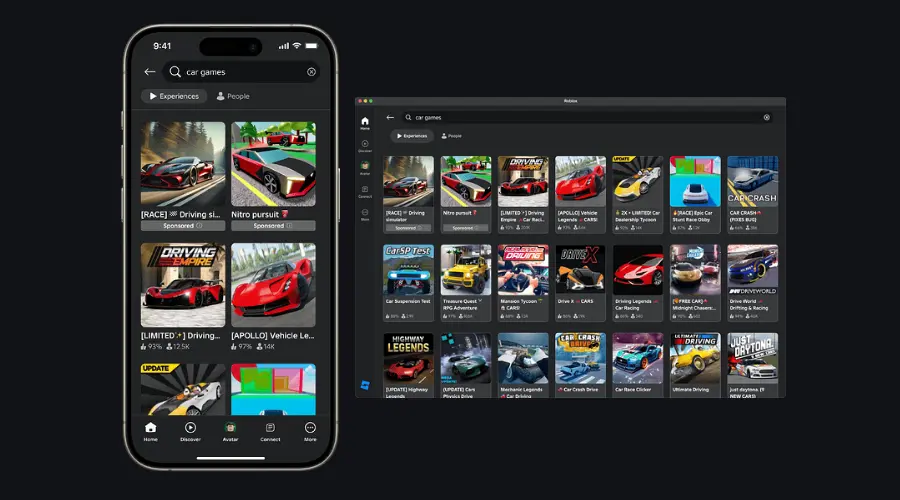
Search Ads appear when players search for specific keywords, genres, or similar experiences inside Roblox.
This format targets users with high intent who already know what type of game they want to play.
It improves conversion rates because players are actively looking for relevant experiences.
3. Immersive Ads (Image, Video, and Portal Ads)
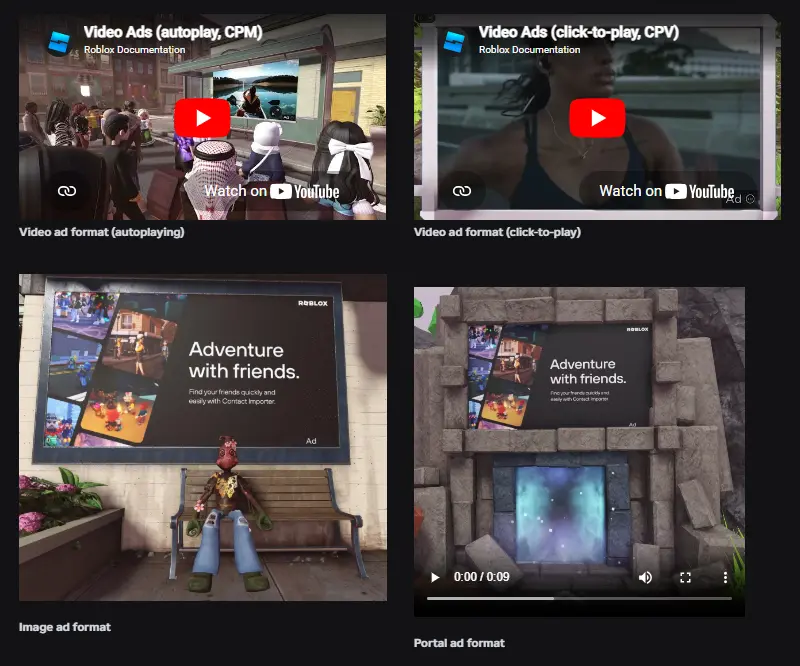
Immersive Ads display interactive or visual ad formats directly inside Roblox gameplay environments.
These ads increase engagement by showing players what the game looks like before they click.
Image and video ads highlight gameplay moments, while portal ads allow users to enter the experience instantly.
This format works best for building interest, curiosity, and stronger engagement before gameplay begins.
How to Promote a Roblox Game Outside the Platform
Most Roblox ad campaigns fail because developers focus on getting clicks instead of improving what happens after players join.
Here are some practical ways you can improve ad performance and generate better results from your Roblox advertising budget.
1. Improve Your Game Thumbnail and Icon First
Your thumbnail and game icon influence ad performance more than most developers realize.
Even if an ad generates clicks, players will often ignore experiences with weak visuals on the experience page.
Before increasing ad spend, test multiple thumbnails and icons to improve click-through and conversion rates.
2. Focus on the First Five Minutes of Gameplay
Advertising brings players into your game, but retention determines whether the campaign will become profitable or not.
If players leave within minutes, increasing the ad budget simply increases acquisition costs without acquiring players sustainably.
Review onboarding, tutorials, rewards, and early progression systems before scaling any Roblox advertising campaign.
3. Avoid Sending Traffic to an Unfinished Experience
Many developers launch ads immediately after publishing a game, wasting budget on players who never return.
Fix major bugs, improve performance, and ensure core gameplay loops are engaging before running paid promotions.
4. Scale Winning Campaigns Gradually
Increasing budget too aggressively can reduce efficiency and make campaign performance less predictable.
Instead of doubling spend overnight, increase budgets gradually while monitoring engagement and retention metrics.
5. Combine Ads With Content Creation
Games that rely only on paid advertising often struggle to maintain long-term growth.
Supporting campaigns with TikTok clips, YouTube videos, and creator partnerships creates additional discovery channels.
6. Track Retention Alongside Ad Metrics
A campaign generating cheap players is not necessarily successful if those players stop playing immediately.
Compare ad performance against Day 1 retention, session length, favorites, and returning player data.
When used together, these strategies help improve player quality, increase retention, reduce wasted ad spend, and create more sustainable Roblox game growth over time.
Conclusion
Learning how to advertise a game on Roblox effectively requires more than simply launching ads and waiting for results.
Roblox Ads Manager can bring players in, but thumbnails, onboarding, retention, and creative testing determine long-term growth.
Developers who combine platform advertising with creator partnerships and social media promotion often build stronger player acquisition systems.
As competition continues to increase, understanding how to advertise a game on Roblox strategically can help developers attract better players and scale more efficiently.
If you are ready to grow your Roblox game with a strategy that drives more players, stronger engagement, and sustainable growth, contact Bizzware today and discover how the right marketing approach can accelerate your success.